Working on MRU extension for Chrome
For my main browser, I have moved from Firefox to Brave. The main reason was that it has many of the base features that I expect from a browser baked in, while in Firefox I had to download extensions to get those functionalities (like ad-blocking). Brave supports all these out of the box. Also, Brave Search and Leo have worked better compared to DuckDuckGo for me.
There’s only one thing to complain about, and that’s the tab switch: In Firefox, when I press `Ctrl+Tab` I get this clean cyclic tab switch feature that helps to easily move back and forth between the open tabs. It is an MRU-style cycle, and I use that a lot. For example, when I open multiple tabs from links on a page, by pressing Ctrl+Tab, I end up on the page I opened last. I press again, and I’m back on my search page.
The good news is that you also get to move linearly between tabs by pressing Ctrl+PageUp and PageDown.
Now, Brave also has “Cycle through the most recently used tabs with Ctrl-Tab”, but by no means is it close to what Firefox provides: There is no preview, and it also messes up the Page Up/Down navigation.
This feature was so important for me that I started looking into the Brave codebase, and I finally found the problem. I posted my findings in the issue that was related to this feature. Sadly, no progress on that, and to be honest, I’m not motivated enough to go and build Brave locally for such a relatively small problem.
So instead, one evening I paired with Claude and created an extension: MRU Tab Switch
Here’s how it looks:
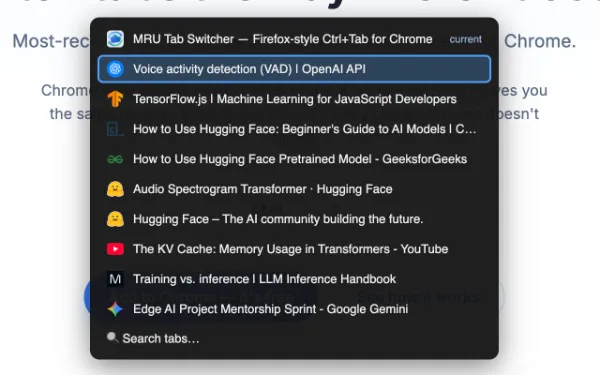
You can easily go to the previous tab by pressing Ctrl + backtick. There’s also a search feature. This was all I needed.
There are some corner cases, like you can’t use it on a new tab, but this is good enough for me.
Here’s the webpage for it. Approval in the Chrome Web Store is still pending. You can download it from the Chrome Web Store here.
Tagged: #Extensions #Web #Productivity